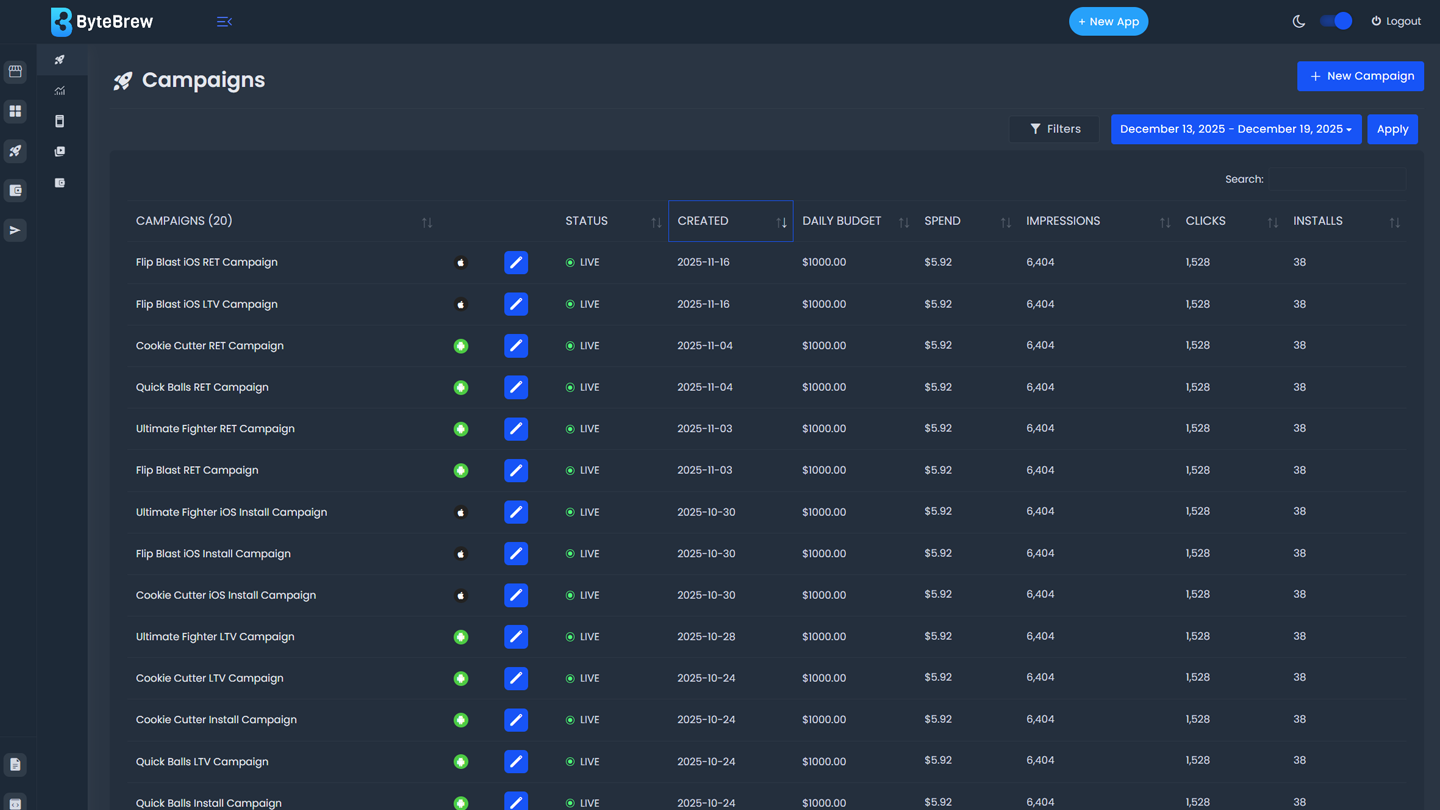
Campaign Dashboard
Located in the ByteBrew Ads dashboard, Campaigns is your home for creating, managing and analyzing your app campaigns.
Required to Start using Campaigns
To start using Campaigns, you must have completed the following items in the table below:
| Initialize ByteBrew | Initialize both ByteBrew SDK and ByteBrew Ads in your app. |
|---|---|
| Implement App Monetization Tracking | Implemented Ad Event Tracking and In-App Purchase Validation in your SDK integration for Ctrl powered LTV and Retention Campaigns. |
| Create Ad Units | Created your app's Ad Units and implemented them into your app. |
| Setup Finance Account | Completed your account's finance setup in the Finance dashboard. |
Campaign Overview Dashboard
In the campaign overview dashboard, you'll find the following for your to manage your running ad campaigns:
| Campaign List | List of your created campaigns |
|---|---|
| Status | Status of your Campaigns
fiber_manual_record
Live: Campaign is running
fiber_manual_record
Inactive: Campaign is not running
fiber_manual_record
Draft: Campaign is in a drafted state and not running
|
| Created | Date the campaign was originally created. |
| Daily Budget | Set daily spend for the campaign. |
| Spend | Amount spent (USD) on the campaign within the date range selected. |
| Impressions | Total number of impressions in the campaign within the date range selected. |
| Clicks | Total number of clicks in the campaign within the date range selected. |
| Installs | Total number of installs in the campaign within the date range selected. |
| eCPI | Cost per Install (CPI) is the calculated average cost for each install driven from the campaign within the date range selected. |
| IPM | Installs per mille (IPM) measures the number of app installs per 1,000 ad impressions within the date range selected. |
| CTR | Click through rate (CTR) is the rate of impressions that result in clicks within the date range selected. |
FAQs
If a campaign is listed in the dashboard and does not have data within a selected range, there wasn't any campaign activity within the range.
If your campaign is receiving low impression count, adjust your campaign bid settings or campaign targets to engage a wider audience. When bids are too low or campaign targets are too high, campaigns will have lower visibility.
Check your finance dashboard to ensure (1) you've completed your finance setup to launch campaigns and (2) you don't have any late payments stopping your campaigns from going live.
ByteBrew Ads is a self-attributing network that utilizes our platform's native attribution systems to track converting installs. This feature is completely free and does not require any additional costs.
No, ByteBrew Ads is a self-attributing network that utilizes our platform's native attribution systems to track converting installs. This feature is completely free and does not require any additional costs.
ByteBrew Ads will only attribute users who consent to tracking to adhere with all platform guidelines.
The dashboard operates in UTC time.
To get a mature test for new campaigns it's best to set a two week minimum.
Yes, over the first week your new campaign is learning the campaign targets you set.
To launch Ctrl campaigns you must have both in-app purchase validation and ad event tracking integrated in your app.
This is calculated using the previous day's data in your portfolio and estimating that over a 7 day period.
ByteBrew Ads is powered by Ctrl, our AI behavior engine that predicts user LTV and retention in real time.
ALT selects the creative with the highest likelihood to engage for every user.
To turn off campaigns follow the Pause Campaigns section on the Manage Camapign page.
Data from users who interacted with your campaign can be received up to 14 days after the campaign is paused.
Yes, you can enable paused campaigns. It may take several hours for results to populate.
Live campaigns cannot be deleted. Only draft campaigns can be deleted.
Yes, navigate to the drafted campaign settings and select the delete button.